Power
Plug-in vs battery clocks: what the backup battery does
The most common surprise in our reviews is not about alarms or dimmers. It is a customer discovering that the batteries do not run the clock. This guide explains the split honestly, model by model, so the box never surprises you.
There are two kinds of clock, and the box looks the same
Pick up any two bedside clocks and you cannot tell from the outside which kind you hold. One kind runs on batteries: put cells in and it works on a shelf, in a tent, anywhere. The other kind runs on wall power, and its battery compartment exists for something quieter: holding on to the time and your alarm setting when the wall fails.
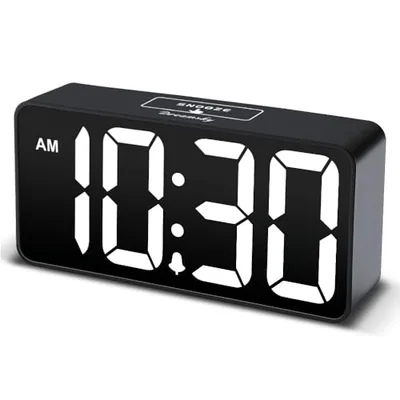
Most DreamSky clocks are the second kind. The display you see in our photos, bright, large, dimmable, is an LED display, and LEDs that size drink more current than loose cells can politely supply for months. So the adapter does the daily work, and the batteries stand guard over the settings.
Neither design is wrong. They are different tools, and the mismatch between what a buyer assumed and what the engineering does is where every one-star power review comes from. Our job on this page is to make the assumption impossible.
What a memory backup battery really does
On a memory-backup model, the moment wall power drops, the display goes dark and the clock appears dead. It is not. A trickle of current from the batteries keeps the timekeeping circuit and your settings alive, invisibly, for the length of the outage.
When power returns, the display simply lights again with the right time on it. No blinking twelve o'clock, no re-entering the alarm, no daylight-saving arithmetic at six in the morning. For most households this is the entire value of the feature, and it is worth the two AAA cells it costs.
| Model | Runs on | Battery keeps settings | Battery lights display | Battery sounds alarm |
|---|---|---|---|---|
| Small Digital Alarm Clock | AC adapter | Yes | No | No |
| Alarm Clock Radio with Battery Backup | AC adapter | Yes | No | No |
| Vibrating Alarm Clock for Heavy Sleepers | Built-in battery | n/a | Yes | Yes |
| Wooden Digital Alarm Clock | AC adapter | Yes | No | Yes |
| Auto-Set Alarm Clock, 5-Inch Display | AC adapter | Yes | No | No |
| Digital Calendar Day Clock | Batteries or wall | n/a | Yes | Yes |
| Wooden Alarm Clock with Date & Day | AC adapter | Yes | No | No |
| Wooden Alarm Clock with Wireless Charging | AC adapter | Yes | No | Yes |
| Auto-Set Alarm Clock with Date & Temperature | AC adapter | Yes | No | No |
| Large Digital Alarm Clock, 9-Inch | AC adapter | Yes | No | No |
| Small Alarm Clock with Night Light | AC adapter | Yes | No | No |
| Clock Radio with Wireless Charging & Bluetooth | AC adapter | Yes | No | No |
What the backup does NOT do on most models: it does not light the display, and it does not sound the alarm while the power is out. If the outage spans your wake-up time, a memory-backup clock stays silent. That line is printed on each product page here, because it is the difference between an inconvenience and a missed flight.
How to tell which kind you own in ten seconds
Unplug it. A battery-first clock keeps its display lit and carries on, a memory-backup clock goes dark at once while its settings sleep safely inside. That single gesture answers the question for any clock in the house, ours or anyone's, faster than any manual.
On our pages you do not need the gesture: every product carries a Power & backup table with four plain lines, including the one that matters, whether the alarm sounds on battery. In the box, the same fact is printed in the quick-start card, and on most adapter-only models it is even molded into a sticker near the battery door, because we would rather repeat ourselves than surprise you.
If you are gifting a clock, pass the knowledge along with it. The one-sentence version fits on a sticky note: plugged in it works, unplugged it only remembers. Most of the support questions we see would never have been asked if that note had shipped with every bedside clock ever sold.
And if you have already been burned by a different brand's clock that reset to a blinking midnight, know that this is exactly the failure the backup battery exists to prevent. The design is not exotic, it just needs two cells you may never think about again.
The exceptions: alarms that survive an outage
A few models carry a stronger battery role, and their pages say so in the Power & backup table: through an outage they keep settings AND sound the alarm at the set time, display off, buzzer on. The wooden clock family includes versions with exactly this behavior.
The strongest exception is the vibrating clock, which is battery-native: a built-in rechargeable cell runs the whole device, wall power or not. It goes under the pillow, shakes to wake, and does not care what the grid is doing. Deep sleepers buy it for the shaking, outage-prone households keep it as the alarm of last resort.
If your area drops power a few times a year and mornings are non-negotiable, the honest configuration is a memory-backup clock for every day plus one battery-native wake-up in the drawer. It costs less than one missed shift.
Why we build most clocks adapter-first
It is fair to ask why the batteries cannot just run everything. They can, in a clock designed around it, and the trade is visible the moment you compare: battery-first designs use dim reflective LCD panels, smaller digits, no permanent glow, because every lumen comes out of the cells.
An adapter-first clock gets to spend power like a lamp. That is what buys the 2-inch digits you can read across the room, the dimmer that still glows faintly at 3 a.m., the USB port on the side feeding your phone. Plug-in power is not a limitation of these clocks, it is the budget their best features are paid from.
The same split explains our radios going the other way. A weather radio exists precisely for the moments the wall fails, so it is battery-native, and the crank models generate their own. Tool matches job in both directions.
There is also a safety angle rarely said out loud: a bedside device that must be readable all night, every night, for years, is better fed by a regulated adapter than by whatever chemistry is left in a drawer's worth of mixed cells. Steady power is part of why LED clocks age gracefully.
So when a listing elsewhere says battery operated in the title and shows a glowing LED photo, read twice. Physics allows both only briefly. One of the two claims is doing the marketing.
USB ports, phone charging and what draws from where
Many of our clocks carry a USB port, and one family adds a wireless pad on top. All of that charging runs from wall power only: on backup batteries the ports are dead, by design, because two AAA cells asked to fill a phone would be empty in minutes and your alarm setting would go with them.
Treat the port as an outlet extender for normal life, not an emergency power source. For genuine outage charging, the hand-crank weather radio carries an actual power bank, sized in the thousands of milliwatt-hours, and can push a meaningful charge into a phone.
If the nightstand's job is charging first and time second, look at the wireless-charging clock radio: one plug feeds the display, the pad and the port, which is one fewer brick behind the furniture.
Reading power complaints in reviews, translated
Scroll any big clock listing and the same three reviews repeat across every brand. «Died after a week» is, more often than not, an adapter that worked loose from the outlet or a power strip switched off at the wall, the clock was never broken, and the fix is reseating two plugs. We would rather say that plainly than pretend our units defy physics.
«Batteries do not work» is the misunderstanding this whole guide addresses: cells were installed, the cord was left in the drawer, and a memory-backup clock did exactly what it was designed to do, which is nothing visible. The review is honest, the expectation was wrong, and the listing that let the buyer expect wrong shares the blame.
«Alarm did not go off after the storm» is the one complaint that deserves engineering attention, and it is why our tables state alarm-on-backup explicitly instead of letting you infer it. When that line says No, believe it and plan with it, when it says Yes, the model was chosen for exactly that night.
We read these reviews the way you should: as a map of expectations, not a scoreboard. We earn confused reviews one box at a time whenever we fail to explain our own power design, so we explain it here.
Which cells, how long they last, when to change them
Memory backup asks almost nothing of the cells: a pair of AAA alkalines typically stands guard for a year or more of ordinary outages. Use name-brand alkalines, not zinc carbon leftovers, and never leave dead cells inside, because a leaked cell ruins the compartment it was supposed to protect.
Rechargeable NiMH cells work too, with one caveat worth knowing: they self-discharge faster than alkalines, so a backup role, which is all waiting and no working, suits a low-self-discharge type best. If the pack says pre-charged and holds charge for a year, it is the right kind.
Change them on a schedule you already keep. The classic advice is smoke-alarm day: when the detector gets its fresh cell at daylight-saving time, the clocks get theirs. Write the month inside the battery door with a pencil and the whole system maintains itself.
For the rechargeable models, the routine is even simpler: the vibrating clock charges like a phone, and its indicator warns before it runs down. Top it up weekly and it never becomes a thought.
A one-evening outage plan for the whole bedroom
Put the pieces together once and stop thinking about it. The bedside clock: memory-backup model, fresh cells, alarm set. The drawer: the vibrating clock or the crank radio, charged, as the wake-up and the news source that need no grid.
During the outage itself, resist the urge to poke the dark clock. It is keeping time, opening the battery door to check is the one move that can actually lose your settings. Light comes from a flashlight, news from the radio, and the clock takes care of itself.
After power returns, glance once: right time, alarm icon on. That is the entire recovery procedure, and it is the reason the backup battery exists.
Travel, dorms and the places without a spare outlet
An adapter-first clock is a homebody. It travels fine between houses, but it will not run on an airplane tray or a campsite table, and a dorm room with two outlets and six devices may not want to spend one on a clock. For those lives, the battery-native pieces are the honest recommendation, even inside our own range.
The vibrating clock is the traveler of the family: pocket-sized, rechargeable, silent to roommates, and indifferent to time zones until you tell it otherwise. Students and shift workers treat it as a personal alarm rather than a room fixture, which is exactly what a shared bedroom wants.
The crank weather radio covers the campsite case, where its self-charging stops being a novelty and becomes the point. Its clock is not its headline feature, but it keeps one, and its power bank tops up the phone that is your real alarm on the road.
What we do not recommend is running an adapter-first clock from a power bank through the USB cord for days. It works until the bank quietly dies at 2 a.m., and then you have built yourself the exact silent failure the backup battery was invented to prevent.
Choosing by your household, in three questions
Question one: how often does your power actually fail? For a city apartment with one outage a year, any memory-backup model is the right answer and the alarm exception is not worth chasing. For storm country, add a battery-native wake-up.
Question two: who is the clock for? A senior household values the no-reset recovery more than anyone, because a blinking wrong clock is worse than a dark one. Our guide to clocks for elderly parents goes deeper on that.
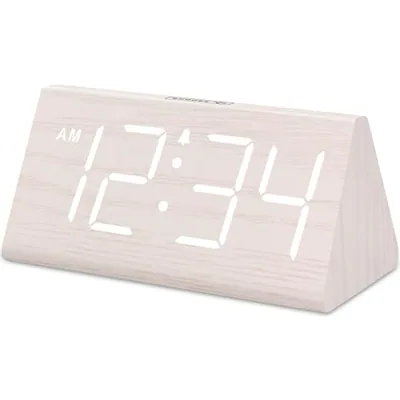
Question three: what else must the nightstand do? If the answer includes charging a phone, the USB and wireless models fold two devices into one plug. If the answer is only telling time and waking you, the plain flagship does it with the fewest parts to misunderstand.
Whatever you pick, read the Power & backup table on its page before checkout. It is four lines long, it is written from what the model itself states, and it is the four lines that prevent the surprise this guide exists to end.
And if after all this the answer is still unclear, default to the flagship small clock plus fresh cells. It is the configuration the most bedrooms end up with, the one with the fewest assumptions to get wrong, and the one this guide can defend line by line.